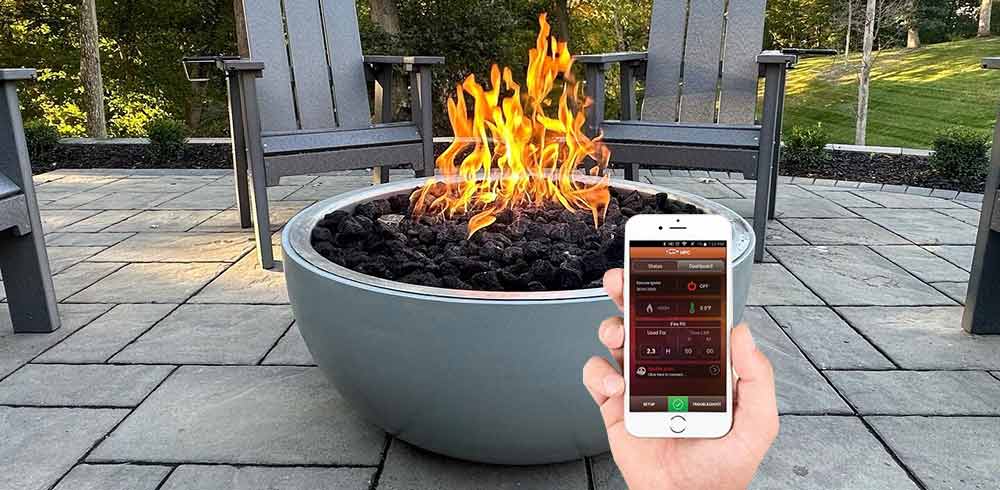
The HPC Fire ONE App can support contractors, builders, landscape professionals, designers, installers, and property teams throughout compatible HPC fire feature projects. Its tools can help professionals visualize products during client planning, review model-specific assembly information, troubleshoot common issues, and operate supported Hi/Lo electronic ignition systems through a smartphone.
The app is available through the Apple App Store and Google Play. Different app features apply at different stages of a project, and smartphone control is limited to compatible HPC ignition and control configurations.
For professionals specifying or installing HPC Fire products, the app can serve as a useful project resource. However, it should be used alongside the current product manual, approved installation drawings, applicable codes, and qualified gas and electrical professionals.
Important: Not every HPC fire feature supports app-based operation. Before promising smartphone control to a client, verify the fire feature model, burner, ignition system, control configuration, voltage, fuel type, and Hi/Lo capability.
What Is the HPC Fire ONE App?
The HPC Fire ONE App is a mobile tool designed to support multiple stages of an HPC fire feature project. Depending on the product and control system, the app may provide:
- Augmented reality product visualization
- Assembly and installation guidance
- Model-specific setup information
- Basic troubleshooting assistance
- Bluetooth pairing
- Compatible fire feature ignition and shutdown
- High and low flame control
- Password-protected operation
- Timer or lockout functions
- Operating information and system alerts
Some functions can be useful during design or product selection without connecting to an installed fire feature. Operational controls, however, depend on the exact HPC electronic ignition and control system installed.
HPC Fire ONE App Compatibility
App availability does not mean that every HPC burner, ignition kit, fire pit, or fire table can be controlled from a phone. Contractors should verify compatibility before specifying app control as part of the project.
Confirm the following:
- HPC product model
- Burner or burner-kit model
- Ignition-system model
- On/Off or Hi/Lo configuration
- Control-module model
- Fuel type
- Input voltage
- Required transformer or power supply
- Bluetooth-control capability
- Current manufacturer documentation
App-based control generally applies only to supported electronic ignition systems equipped with the required Hi/Lo functionality and compatible controls. A standard match-lit, push-button, or basic On/Off system cannot gain flame modulation simply because the app is installed on a phone.
The App Does Not Replace Professional Installation Requirements
The HPC Fire ONE App may supplement the installation process, but it does not replace:
- Manufacturer installation instructions
- Approved product listings
- Gas-line sizing calculations
- Gas-pressure verification
- Leak testing
- Electrical planning
- Combustible-clearance verification
- Ventilation and drainage planning
- Permit requirements
- Local codes
- Required inspections
- Qualified gas or electrical work
Always use the current documentation for the exact product being installed. Stop work and contact the manufacturer or a qualified professional when site conditions conflict with the product instructions or listing.
How Contractors Can Use the HPC Fire ONE App
The app can support several phases of residential, commercial, hospitality, and multifamily projects.
| App Capability | Project Stage | Professional Application |
|---|---|---|
| Augmented Reality | Sales, design, and client presentation | Help clients compare fire feature scale, style, and potential placement before final specification. |
| Product Information | Specification and planning | Review available product information while preparing the project scope and installation plan. |
| Guided Assistance | Assembly and installation | Supplement printed instructions with component identification, tool preparation, and assembly guidance. |
| Troubleshooting | Commissioning and service | Review common symptoms and recommended checks before escalating a technical support request. |
| Bluetooth Control | Commissioning and operation | Pair and test supported Hi/Lo electronic ignition systems from a compatible smartphone. |
| Timers and Lockouts | Commercial operations and handoff | Help property teams establish controlled operating periods and reduce unauthorized use. |
| Operating Information | Maintenance and service | Review available system data, alerts, temperature information, or usage details supported by the installed system. |
Using Augmented Reality During Client Planning
The augmented reality feature can help contractors and designers introduce clients to the scale and appearance of compatible HPC fire pits and fire tables before a product is ordered.
Using a phone camera, the app can place a digital representation of a compatible fire feature within the proposed outdoor space. This may help clients visualize a product that is difficult to evaluate from dimensions and product photography alone.
Contractors can use augmented reality to:
- Compare round, square, rectangular, and linear fire features.
- Demonstrate the approximate footprint of a product.
- Evaluate possible locations during an early site visit.
- Show relationships between a fire feature and nearby seating.
- Help clients compare fire pit and fire table styles.
- Support design presentations and preliminary approvals.
- Narrow product options before final specification.
- Communicate general scale to architects or property teams.
Limits of Augmented Reality Visualization
Augmented reality should be treated as a presentation and visualization tool, not as a final installation plan.
The app cannot independently confirm:
- Exact product dimensions in the field
- Combustible clearances
- Required ceiling or overhead clearances
- Gas-line capacity
- Gas pressure
- Electrical availability
- Required ventilation
- Drainage conditions
- Wind exposure
- Traffic patterns
- Emergency access
- Local code compliance
- Structural support
- Whether surrounding materials are combustible
Complete field measurements and compare the installation location against the current product manual before approving placement.
Pre-Installation Planning for an HPC Fire Feature
Before using the app for assembly or commissioning, confirm that the site and selected product are compatible.
Product and Fuel Information
- Verify the exact HPC product and burner model.
- Confirm natural gas or propane configuration.
- Confirm the required orifice and regulator configuration.
- Verify burner size and rated BTU input.
- Confirm the ignition-system model.
- Verify whether the system is On/Off or Hi/Lo.
- Confirm app-control compatibility.
Gas-Supply Planning
- Calculate the required gas-line size.
- Account for total developed length.
- Account for fittings and pressure loss.
- Verify available inlet pressure.
- Confirm the supply can support the appliance at full input.
- Provide an accessible shutoff valve.
- Complete required pressure and leak testing.
Enclosure Planning
- Verify ventilation requirements.
- Confirm drainage provisions.
- Maintain required clearances.
- Use approved noncombustible materials where required.
- Provide access to the valve and ignition components.
- Protect electrical components from water intrusion.
- Ensure the burner can be installed level.
- Plan for future service and component replacement.
Electrical and Control Planning
- Confirm the required supply voltage.
- Verify transformer requirements.
- Provide an approved electrical connection.
- Protect wiring from heat and sharp edges.
- Confirm control-module access.
- Confirm Bluetooth signal considerations.
- Identify the manual control and emergency shutoff locations.
Using the App as an Installation Reference
The HPC Fire ONE App may provide guided information for compatible products, including tool preparation, component identification, assembly steps, and basic setup guidance.
This can be useful when an installer needs a visual supplement to the printed manual or wants to confirm the intended sequence of component assembly.
The app may help support:
- Product identification
- Required tool preparation
- Component layout
- Assembly sequence
- Ignition-component identification
- Media-placement guidance
- Control setup
- Basic operational checks
- Initial troubleshooting
Use the app together with the installation manual. When information differs, stop and verify the current manufacturer documentation for the exact product model.
Contractor Installation Checklist
Use this checklist as a general project aid. It does not replace the model-specific installation instructions.
- Exact product model confirmed
- Serial number recorded
- Fuel type confirmed
- Ignition type confirmed
- On/Off or Hi/Lo configuration confirmed
- App-control compatibility verified
- Burner size and BTU input confirmed
- Gas line sized for the total load
- Required inlet pressure confirmed
- Accessible gas shutoff installed
- Enclosure dimensions verified
- Combustible clearances verified
- Ventilation openings completed
- Drainage provisions completed
- Electrical supply and voltage confirmed
- Transformer installed where required
- Control components remain accessible
- Wiring protected from heat and damage
- Burner installed level
- Ignition components positioned correctly
- Burner ports free from obstruction
- Media installed to the approved depth
- Ignition components not buried improperly
- Gas connections leak-tested
- Operating pressure verified where required
- Manual shutoff tested
- Electronic ignition tested
- Flame pattern evaluated
- High and low flame functions tested
- App paired and tested where supported
- Shutdown operation tested
- Service access maintained
Commissioning Compatible Hi/Lo Electronic Ignition Systems
Compatible HPC Hi/Lo electronic ignition systems may allow a contractor or authorized user to control the fire feature through the HPC Fire ONE App.
Commissioning should include the complete ignition, flame-control, shutdown, pairing, and reconnection sequence. Do not consider the system commissioned after testing only the initial ignition command.
Before Pairing
- Confirm the ignition system supports app control.
- Verify power to the ignition and control system.
- Confirm the gas supply is open.
- Complete all required leak testing.
- Inspect ignition wiring and component connections.
- Confirm the phone meets app requirements.
- Install the current version of the app.
- Enable Bluetooth.
- Enable required app permissions.
- Keep the phone within the recommended range.
General Pairing Workflow
The exact process may vary by product and app version. Follow the current manufacturer instructions.
- Open the HPC Fire ONE App.
- Enable Bluetooth and required device permissions.
- Confirm power to the fire feature control system.
- Open the app's control or device-discovery area.
- Allow the app to search for compatible nearby devices.
- Select the correct fire feature or control module.
- Complete any required confirmation or password step.
- Wait for the app to confirm the connection.
- Test ignition.
- Test high flame.
- Test low flame.
- Test shutdown.
- Test timer or lockout features where supported.
- Close and reopen the app to verify reconnection.
Commissioning Checklist for App-Controlled Fire Features
- Correct app installed
- App updated
- Phone operating system supported
- Bluetooth enabled
- Required permissions enabled
- Correct fire feature identified
- Pairing completed
- Ignition command tested
- Flame established reliably
- High flame tested
- Low flame tested
- Shutdown tested
- Automatic relight tested where required and permitted
- Timer tested
- Lockout tested
- Password protection configured where required
- Manual control tested
- Emergency shutoff identified
- Reconnection tested
- Customer or property team trained
Bluetooth and App Troubleshooting
| Symptom | Possible Causes | What to Check | Recommended Action |
|---|---|---|---|
| App Cannot Find the Fire Feature | Bluetooth disabled, permissions denied, incompatible ignition system, no control power, excessive distance | Bluetooth status, permissions, ignition model, power supply, phone location | Enable Bluetooth and permissions, move closer, verify power, and confirm compatibility. |
| Device Appears but Will Not Pair | Another device connected, incomplete pairing sequence, control needs reset, incorrect device selected | Nearby paired phones, device name, app prompts, manufacturer reset procedure | Disconnect other devices, repeat pairing, and follow the approved reset process. |
| App Connects but Fire Feature Will Not Ignite | Gas supply closed, ignition fault, no flame-proving signal, control fault, low inlet pressure | Gas supply, ignition attempt, spark or hot-surface igniter, control status, manufacturer diagnostics | Troubleshoot the fire feature and ignition system separately from the app. |
| Connection Drops Repeatedly | Excessive distance, enclosure interference, phone power settings, outdated app, control-module issue | Operating distance, enclosure materials, app version, Bluetooth settings, control power | Move closer, update the app, confirm stable power, and inspect installation conditions. |
| High/Low Control Does Not Work | On/Off system installed, incompatible control, actuator fault, wiring issue | Ignition configuration, model number, control wiring, app-supported functions | Confirm the system is a compatible Hi/Lo configuration before replacing components. |
| App Does Not Reconnect | Bluetooth session error, device reset, phone changed, permissions removed, app data cleared | Phone settings, saved device, app permissions, system power | Restart Bluetooth, reopen the app, and complete pairing again if required. |
| Timer or Lockout Is Not Working as Expected | Incorrect settings, app not connected, unsupported feature, incomplete programming | App status, timer values, permissions, supported functions | Reconnect, verify compatibility, and reprogram the feature according to instructions. |
The App Cannot Find the Fire Feature
If the fire feature does not appear during device discovery, check the basic connection requirements first.
- Confirm the installed ignition system supports the app.
- Enable Bluetooth on the phone.
- Enable required location or nearby-device permissions.
- Move the phone closer to the fire feature.
- Confirm power to the control system.
- Close and reopen the app.
- Restart Bluetooth.
- Check for an available app update.
- Confirm another phone is not actively connected.
- Follow the manufacturer reset procedure if required.
The App Connects but the Fire Feature Does Not Ignite
A successful Bluetooth connection confirms communication with the control system, but it does not prove that the gas and ignition components can complete the ignition sequence.
Inspect:
- Gas supply
- Manual shutoff position
- Inlet pressure
- Ignition-system power
- Igniter condition
- Flame-sensor condition
- Wiring connections
- Burner obstruction
- Water intrusion
- Control-module status
Do not repeatedly cycle the ignition system when unburned gas may be present. Follow the manufacturer’s shutdown and purge instructions before another ignition attempt.
The App Connects but High/Low Control Does Not Work
First verify that the installed system supports flame adjustment. A compatible On/Off electronic ignition system may support smartphone ignition without supporting flame modulation.
Confirm:
- The ignition model is a Hi/Lo configuration.
- The correct control system was ordered.
- The valve or actuator connections are complete.
- The app identifies the supported flame-control functions.
- The low-fire setting was commissioned correctly.
- The control system is not reporting a fault.
Commercial and Multifamily Applications
App-based operation may be useful for commercial and shared fire features when it is incorporated into a complete operating and safety plan.
Potential project settings include:
- Hotels
- Resorts
- Restaurants
- Apartment communities
- Condominium courtyards
- Rooftop lounges
- Rental properties
- Event venues
- Corporate campuses
- Golf and country clubs
- Senior-living communities
- Hospitality patios
Depending on the installed system, useful operational features may include:
- Password-protected access
- Timers
- Operating lockouts
- Controlled ignition
- High and low flame settings
- System information
- Operating alerts
- Burn-time information
The app should not be treated as the only safety measure, emergency shutoff, or access-control system. The project must still include required manual shutoffs, emergency procedures, physical safeguards, signage, supervision, and property-specific operating policies.
Creating a Commercial Fire Feature Control Plan
Before handing over an app-controlled fire feature, document how the property intends to operate and manage the system.
A commercial control plan should identify:
- Authorized operators
- Who owns or manages the paired device
- Who controls the password
- Approved operating hours
- Timer settings
- Lockout procedures
- Daily startup procedure
- Daily shutdown procedure
- Emergency shutoff location
- Gas shutoff location
- Manual backup-control location
- Who performs visual inspections
- Who responds to system alerts
- Who schedules maintenance
- What happens when staff changes
- How a lost or replaced phone is handled
- Who contacts the installer or manufacturer for service
Customer and Property-Manager Handoff
Provide a complete operational demonstration before turning the fire feature over to the customer, property manager, or facilities team.
Demonstrate:
- How to download the app
- How to enable required phone permissions
- How to enable Bluetooth
- How to identify the correct fire feature
- How to pair the phone
- How to ignite the fire feature
- How to adjust between high and low flame
- How to use the timer
- How to configure a lockout
- How to shut down normally
- How to use the manual control where applicable
- Where the emergency shutoff is located
- What to do when the app will not connect
- Which conditions require professional service
Leave the customer or property team with:
- HPC product model
- Serial number
- Burner model
- Ignition-system model
- Fuel type
- Voltage information
- Current product manual
- App instructions
- Emergency shutoff instructions
- Installer contact information
- Manufacturer support information
- Recommended maintenance schedule
Maintenance and Seasonal Testing
Include the app-controlled system in the fire feature’s regular inspection and maintenance plan.
Before the primary operating season:
- Inspect the burner and ignition components.
- Remove debris from burner ports.
- Inspect wiring for heat or water damage.
- Confirm drainage remains open.
- Inspect the control enclosure.
- Confirm the gas shutoff operates.
- Confirm the manual control operates.
- Update the app.
- Confirm phone permissions.
- Test Bluetooth pairing.
- Test ignition.
- Test high and low flame.
- Test timer and lockout functions.
- Test shutdown.
- Review commercial operating procedures.
When App Troubleshooting Is Not Enough
The app may help identify basic connection, setup, or operational issues, but it cannot diagnose every gas, electrical, combustion, or installation problem.
Stop operation and arrange qualified service when there is:
- Gas odor
- A failed leak test
- Delayed ignition
- Flame rollout
- Ignition outside the intended burner area
- An abnormal flame pattern
- Repeated ignition failure
- Repeated safety shutdown
- Damaged wiring
- Heat-damaged controls
- Water inside the control enclosure
- Corroded ignition components
- Unusual noise from the valve or control system
- An unstable gas supply
- Evidence of incorrect media placement
- A control system that operates unpredictably
Shut down the fire feature according to the manufacturer’s instructions and close the gas supply when required.
Information to Gather Before Contacting Support
Collecting complete project information can help SpotixPro or HPC technical support narrow down compatibility and operational issues more efficiently.
Gather:
- HPC product model
- Product serial number
- Burner model and size
- Ignition-system model
- On/Off or Hi/Lo configuration
- Fuel type
- Supply voltage
- Transformer model
- Control-module information
- Installation date
- App version
- Phone make and model
- Phone operating-system version
- Bluetooth status
- App permission settings
- Exact error message
- Screenshots of the app
- Photos of the fire feature
- Photos of the burner and ignition components
- Photos of the control enclosure
- Video of the operating issue where helpful
- Available gas pressure information
- Troubleshooting steps already completed
Frequently Asked Questions About the HPC Fire ONE App
Is the HPC Fire ONE App free?
The app is available for download through the Apple App Store and Google Play. Review the current app listing for device requirements and availability.
Does the HPC Fire ONE App control every HPC fire feature?
No. Smartphone control is limited to compatible HPC electronic ignition and control systems. Verify the exact ignition configuration before specifying app-based operation.
Which HPC ignition systems support smartphone control?
Compatibility depends on the current ignition and control configuration. Supported Hi/Lo electronic ignition systems may offer app control, but contractors should verify the exact model with current HPC documentation.
Does the app use Bluetooth or Wi-Fi?
Compatible fire feature control uses Bluetooth communication. The phone must be within the supported operating range and have the required permissions enabled.
Can the app control flame height?
Only compatible Hi/Lo systems support high and low flame adjustment. The app cannot add flame modulation to an On/Off or manual system.
Can the app control a match-lit fire pit?
No. A match-lit system uses a manual gas valve and external ignition source. It does not include the electronic control components required for app operation.
Can more than one phone control the same fire feature?
This depends on the control system and current app behavior. Contractors should test the intended multi-user workflow and review the manufacturer’s instructions before commercial handoff.
Can one phone control multiple HPC fire features?
The app may identify multiple compatible systems, but each project should be tested individually. Clearly label fire features in commercial settings to reduce the risk of operating the wrong unit.
What happens if the phone is lost or replaced?
The replacement phone may need the app, required permissions, credentials, and a new pairing sequence. Commercial operators should document passwords and device-turnover procedures.
Can the fire feature operate without the app?
This depends on the installed control system. Verify the approved manual, wall-switch, remote, or emergency-control options during commissioning.
How close must the phone be to the fire feature?
Bluetooth range varies with the phone, control location, enclosure materials, physical obstructions, and site conditions. Test operation from the expected user location before completing handoff.
Why will the app not find the fire feature?
Common causes include disabled Bluetooth, denied permissions, excessive distance, loss of control power, another connected device, or an incompatible ignition system.
Can contractors use augmented reality for final fire feature placement?
No. Augmented reality can support visualization, but final placement must be based on field measurements, clearances, product instructions, utilities, ventilation, drainage, and applicable codes.
Is the app suitable for commercial properties?
It may support compatible commercial fire feature operation, especially when timers, lockouts, or password protection are available. It should be incorporated into a broader safety and operating plan.
Does the app replace the installation manual?
No. Always use the current model-specific manufacturer instructions as the primary installation and service reference.
Can the app diagnose gas-pressure or gas-line-sizing problems?
No. Gas supply and pressure issues require proper calculations, instruments, testing procedures, and qualified professionals.
Can the app identify a gas leak?
The app is not a substitute for approved leak-testing procedures or gas-detection equipment. Stop operation immediately if a gas leak is suspected.
Why does the app connect but the burner not ignite?
The Bluetooth connection may be working while the fire feature has a gas-supply, ignition, wiring, flame-sensing, or control problem. Troubleshoot the appliance separately from the app connection.
Can the app prevent unauthorized operation?
Compatible systems may include password or lockout features, but these should not be the property’s only safeguards against unauthorized use.
How SpotixPro Supports HPC Fire Projects
Specifying a connected fire feature requires coordination between the burner, ignition system, controls, utilities, enclosure, and intended operating method.
SpotixPro supports contractors, builders, landscape professionals, designers, and commercial project teams with exclusive trade pricing, product guidance, and order support.
Our product specialists can help professionals:
- Compare HPC Fire products.
- Identify compatible ignition and control options.
- Compare On/Off and Hi/Lo configurations.
- Review available voltage and fuel options.
- Select complete gas fire pit kits.
- Find compatible fire pit ignition systems.
- Locate replacement components.
- Prepare product information for technical support.
- Coordinate residential and commercial project orders.
For help selecting a compatible HPC fire feature, ignition system, or control configuration, contact the Spotix team with the project details, fuel type, required BTU input, voltage, control preferences, and installation conditions.