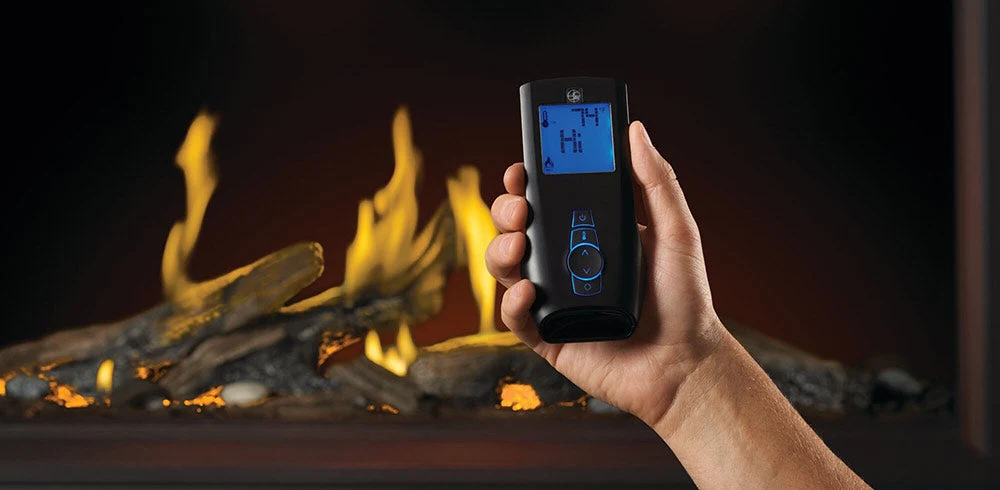
Gas fireplace remote controls can simplify appliance operation, but they can also create installation questions and post-project callbacks when the transmitter, receiver, valve, or control module is not configured correctly. This SpotixPro guide helps contractors identify compatible remote systems, complete installation and pairing, troubleshoot common control problems, and prepare customers to operate their fireplaces confidently.
Fireplace remotes range from basic on-and-off transmitters to programmable controls with thermostatic operation, timers, and flame-height adjustment. Although many remote systems look similar, their internal components and compatibility requirements can differ significantly.
Before installing or replacing a fireplace remote, verify the fireplace model, ignition system, gas valve, and manufacturer requirements. A remote should never be selected based only on appearance or assumed to be universal.
Always follow the fireplace and remote-control manufacturers' instructions. Gas valve work, electrical connections, and appliance service should be performed by qualified professionals in accordance with applicable codes and product listings.
How a Gas Fireplace Remote Control System Works
A fireplace remote system generally uses a handheld transmitter to send a wireless signal to a receiver or control module located near or inside the fireplace. The receiver then communicates with the fireplace controls to turn the appliance on, turn it off, or adjust supported functions.
The exact configuration depends on the appliance and remote system, but common components include:
- Handheld transmitter
- Remote receiver
- Receiver antenna
- Battery compartment
- Control module
- Gas valve
- Ignition system
- Wall switch or wall control
- Wiring harness
- Thermostatic sensor
- Flame-modulation connection where supported
Some systems use a separate receiver box with an ON, REMOTE, and OFF switch. Others use an integrated electronic control module that pairs directly with the handheld transmitter.
Common Fireplace Remote System Components
Handheld Transmitter
The transmitter is the remote the customer uses to control the fireplace. Depending on the model, it may provide basic on-and-off operation or additional functions such as thermostat control, timers, flame-height adjustment, auxiliary outputs, and programmable schedules.
Receiver
The receiver accepts the signal from the transmitter and sends the appropriate command to the fireplace controls. Many aftermarket receivers are battery-powered and include a manual slide switch.
Common receiver-switch positions include:
- ON: Operates the fireplace manually without the remote.
- REMOTE: Allows the handheld transmitter to control the fireplace.
- OFF: Prevents burner operation through the receiver.
The exact switch labels and functions vary. Refer to the remote manual before using the switch for diagnostic purposes.
Gas Valve or Control Module
The receiver must be compatible with the appliance's valve or electronic control system. A remote designed to close a millivolt switch circuit may not be compatible with an electronic ignition module or a proprietary manufacturer control system.
Batteries and Power Supply
Many fireplace remote problems are caused by weak, missing, corroded, or incorrectly installed batteries. Both the handheld transmitter and receiver may require batteries, even when the fireplace itself uses household power.
Other systems may use an AC adapter, transformer, or fireplace control module for power.
Types of Gas Fireplace Remote Controls
Basic On-and-Off Remotes
Basic remotes allow the user to turn the main burner on and off. These controls are often used with compatible millivolt systems and are a straightforward option when the customer does not need temperature regulation or programmable operation.
Basic controls may be appropriate for:
- Simple fireplace operation
- Rental properties
- Guest rooms
- Customers who prefer fewer settings
- Replacement of an existing basic remote system
Thermostatic Remotes
Thermostatic remotes monitor the temperature near the transmitter and cycle the fireplace according to the selected setpoint.
Because the temperature sensor is typically inside the remote, its location can affect performance. A remote placed near the fireplace, in direct sunlight, near a draft, or against an exterior wall may sense a temperature that does not represent the occupied area.
Timer Remotes
Timer controls allow the customer to operate the fireplace for a selected period. This can help prevent the fireplace from remaining on unintentionally, but it may also cause confusion when a customer does not realize a timer is active.
Programmable Remotes
Programmable controls may allow customers to create operating schedules, temperature periods, or automatic setbacks. These remotes require additional customer education during project handoff.
Flame-Modulating Remotes
Some fireplace systems allow the remote to adjust flame height. This requires a compatible modulating valve, stepper motor, control module, or manufacturer-specific system.
A remote with flame-height buttons cannot add modulation to a fireplace that only supports basic on-and-off operation.
Smart and Wi-Fi Controls
Some newer fireplaces use mobile apps, Wi-Fi modules, Bluetooth, or smart-home integrations. These systems may be factory-installed, optional, or proprietary to the appliance manufacturer.
Contractors should verify:
- App compatibility
- Supported mobile operating systems
- Required Wi-Fi frequency
- Module placement
- Network permissions
- Pairing requirements
- Whether remote operation is permitted for the specific fireplace
Fireplace Remote Compatibility
Fireplace remotes are not universally interchangeable. Selecting a compatible system requires more than matching the brand name or choosing a transmitter with similar buttons.
Before ordering a remote, identify:
- Fireplace manufacturer
- Fireplace model number
- Fireplace serial number
- Ignition type
- Gas valve model
- Existing receiver model
- Existing transmitter model
- Control-module model
- Required functions
- Whether the system is factory-installed or aftermarket
Millivolt Fireplace Systems
Many standing-pilot fireplaces use a thermopile to generate a small electrical current. A compatible remote receiver may function as a switch in the millivolt circuit, opening or closing the circuit to control the main burner.
Even within millivolt applications, contractors must verify the wiring configuration, valve requirements, and remote rating.
Electronic Ignition Systems
Intermittent-pilot and direct-ignition fireplaces often use an electronic control module. These appliances may require a manufacturer-specific transmitter, receiver, wall control, or interface module.
Do not connect a generic millivolt receiver to an electronic ignition system unless the fireplace manufacturer specifically approves the configuration.
Proprietary Fireplace Controls
Some fireplace brands use proprietary remotes that communicate directly with the appliance control module. These systems may manage ignition, flame height, blower speed, lighting, accent functions, and diagnostics.
Replacing only the handheld transmitter may require model-specific pairing. In other cases, the transmitter and receiver must be replaced as a matched set.
Factory-Built Controls Versus Aftermarket Remotes
An aftermarket remote may be appropriate for certain fireplaces, but it should not be used to bypass required factory safety controls or alter the appliance outside its listing.
When possible, identify the exact fireplace model and confirm approved replacement or upgrade options before ordering.
Information to Confirm Before Installation
Before opening the remote packaging or beginning installation, verify:
- The remote is compatible with the fireplace and valve.
- The package includes the correct transmitter and receiver.
- The remote provides the functions requested by the customer.
- The receiver has an accessible mounting location.
- Receiver wiring can reach the approved connection points.
- The receiver will be protected from excessive heat.
- The antenna can be positioned according to instructions.
- Battery access will remain available after installation.
- The wall switch can remain connected if permitted.
- The fireplace has been tested independently of the remote.
Remote Receiver Placement
Receiver placement can affect performance, accessibility, and component life.
Follow the manufacturer’s instructions for the approved receiver location. In general, the receiver should be:
- Protected from excessive heat
- Protected from direct flame exposure
- Kept away from moving components
- Accessible for battery replacement
- Positioned so the antenna is not tightly coiled or trapped
- Protected from sharp metal edges
- Mounted where wires will not be pinched
- Kept away from water or condensation
Do not place the receiver where future battery replacement requires unnecessary removal of finished materials or major appliance disassembly.
Gas Fireplace Remote Installation Workflow
Step 1: Verify Fireplace Operation
Confirm that the fireplace operates correctly before adding the remote system. If the appliance does not light from its existing manual controls or wall switch, installing a new remote may not resolve the underlying issue.
Verify:
- Gas supply is on.
- The shutoff valve is open.
- The pilot or ignition system operates.
- The main burner operates.
- The existing switch circuit works.
- The fireplace is not displaying a fault.
Step 2: Shut Down the Appliance
Turn off the fireplace and allow it to cool. Shut off electrical power and gas when required by the manufacturer’s installation instructions.
Step 3: Inspect the Remote Components
Confirm that the transmitter, receiver, wiring, batteries, instructions, and accessories are present and undamaged.
Step 4: Connect the Receiver
Connect the receiver only to the terminals or wiring points approved for the fireplace and remote system.
Do not:
- Connect a low-voltage receiver to line voltage.
- Bypass the appliance safety circuit.
- Modify the gas valve.
- Cut proprietary wiring harnesses unless directed.
- Use an unapproved remote to control ignition functions.
Step 5: Install Batteries
Install fresh batteries in the transmitter and receiver, observing the correct polarity. Avoid mixing old and new batteries or combining battery types.
Step 6: Position the Receiver
Place the receiver in its approved location, route the wiring safely, and position the antenna as instructed.
Step 7: Pair or Synchronize the Remote
Follow the model-specific learning or synchronization process. Pairing procedures vary and may involve:
- Pressing a learn button
- Moving the receiver switch
- Holding buttons on the transmitter
- Waiting for a confirmation beep
- Matching DIP-switch positions
- Completing a timed sequence
Step 8: Test Every Function
Test the remote's complete range of supported functions, not only the on-and-off command.
Step 9: Complete Customer Handoff
Explain the receiver switch, remote modes, battery locations, thermostat operation, timer settings, and basic troubleshooting before leaving the project.
How to Pair a Gas Fireplace Remote
Pairing procedures differ by model, but a typical process may include the following steps:
- Install fresh batteries in the transmitter and receiver.
- Place the receiver switch in the specified position.
- Press and release the receiver's learn button.
- Listen for a beep or watch for an indicator light.
- Press the designated button on the transmitter.
- Wait for the receiver to confirm pairing.
- Test the fireplace from the remote.
Some older systems use DIP switches rather than an electronic learn function. The switch pattern in the transmitter must match the pattern in the receiver.
Always use the instructions for the exact remote model. Repeatedly pressing random button combinations may clear settings or place the control in an unintended mode.
Remote Will Not Pair With the Receiver
If the transmitter and receiver will not synchronize, inspect the most common causes before replacing components.
- Install fresh batteries in both devices.
- Confirm battery polarity.
- Confirm the receiver is in the correct switch position.
- Move the transmitter closer to the receiver.
- Confirm the learn button was pressed correctly.
- Repeat the pairing process within the required time window.
- Check whether the system uses matching DIP switches.
- Confirm the remote belongs to the receiver.
- Check the transmitter and receiver model numbers.
- Inspect the receiver antenna.
- Remove nearby sources of interference when practical.
- Reset the system according to the manual.
If a replacement transmitter will not pair with the existing receiver, the components may not be compatible even when they appear visually identical.
Gas Fireplace Remote Troubleshooting Table
| Symptom | Possible Causes | What to Check | Recommended Action |
|---|---|---|---|
| Remote Display Is Blank | Dead batteries, incorrect polarity, damaged battery contacts, failed transmitter | Transmitter batteries, battery terminals, corrosion, display response | Install fresh batteries and clean minor terminal corrosion according to the manufacturer's instructions. |
| Receiver Does Not Respond | Dead receiver batteries, switch in OFF position, loose connection, failed receiver | Receiver batteries, switch position, wiring, confirmation beep or light | Replace batteries, place the receiver in the correct mode, and inspect approved wiring connections. |
| Receiver Clicks but Fireplace Does Not Light | Gas supply issue, pilot issue, open safety circuit, weak millivolt output, valve problem | Pilot, gas supply, manual switch operation, valve circuit, appliance fault | Troubleshoot the fireplace and ignition system separately from the remote. |
| Fireplace Works Manually but Not From Remote | Lost pairing, remote lock, receiver switch position, weak batteries, incompatible components | Pairing, lock icon, batteries, model numbers, receiver mode | Unlock, replace batteries, pair the system, and verify compatibility. |
| Remote Works Intermittently | Weak batteries, poor antenna position, excessive distance, interference, overheating receiver | Battery condition, receiver placement, antenna, signal path, operating temperature | Replace batteries and reposition the receiver or antenna according to instructions. |
| Fireplace Turns Off Unexpectedly | Thermostat satisfied, timer expired, low receiver batteries, lost signal, appliance safety shutdown | Remote mode, timer, setpoint, batteries, fireplace error conditions | Determine whether the remote issued the command or the fireplace shut down for another reason. |
| Thermostat Does Not Cycle Correctly | Remote location, incorrect mode, setpoint, temperature calibration, communication issue | Remote location, room temperature, mode icon, setpoint, battery condition | Move the remote to a representative room location and verify thermostat programming. |
| Flame Height Will Not Adjust | Fireplace does not support modulation, incorrect remote, control-module issue, low batteries | Fireplace capabilities, remote compatibility, module connections, batteries | Confirm the appliance supports remote modulation before replacing components. |
| Remote Buttons Do Not Respond | Child lock, weak batteries, damaged keypad, incorrect operating mode | Lock indicator, batteries, display, button response | Disable the lock, replace batteries, and follow the reset procedure if needed. |
| Clock or Schedule Resets | Battery removal, weak batteries, incomplete programming, transmitter fault | Battery condition, programming steps, saved schedule | Install fresh batteries and repeat the complete programming sequence. |
The Remote Display Is Blank
If the transmitter display is blank, begin with the batteries.
- Install fresh batteries of the specified type.
- Confirm correct polarity.
- Inspect the battery terminals.
- Check for corrosion or leakage.
- Confirm any battery-isolation tab has been removed.
- Press multiple buttons to test the display.
If the display remains blank after installing confirmed-good batteries, the transmitter may need replacement.
The Remote Beeps but the Fireplace Does Not Turn On
A transmitter beep may indicate that the remote accepted the command, but it does not confirm that the receiver or fireplace completed it.
Check:
- Whether the receiver responds
- Whether the receiver is in REMOTE mode
- Whether the receiver batteries are fresh
- Whether the pilot is operating
- Whether the gas supply is on
- Whether the fireplace works manually
- Whether an appliance safety condition is preventing operation
If the receiver clicks but the burner does not light, troubleshoot the fireplace control and ignition system rather than assuming the handheld remote has failed.
The Receiver Clicks but the Main Burner Does Not Light
A clicking receiver generally indicates that the receiver is attempting to open or close its control circuit.
Possible causes beyond the remote include:
- Pilot is not lit on a standing-pilot system.
- Gas shutoff valve is closed.
- Thermopile output is insufficient.
- Safety switch is open.
- Valve wiring is loose.
- Gas valve is not operating.
- Electronic control module has detected a fault.
- Fireplace requires a different control command.
Confirm whether the fireplace operates through its approved manual switch or diagnostic process before replacing the receiver.
The Fireplace Works From the Wall Switch but Not the Remote
If the fireplace works from the wall switch, the burner, gas supply, and basic switch circuit may be functioning correctly.
Inspect:
- Receiver batteries
- Receiver switch position
- Transmitter batteries
- Remote pairing
- Child-lock settings
- Receiver wiring
- Remote and receiver compatibility
Some installations allow a wall switch and remote to operate the same fireplace, while others require a specific wiring arrangement. Follow the fireplace and remote instructions.
The Fireplace Works Only When the Receiver Is Set to ON
If the fireplace operates when the receiver is set to ON but not when it is set to REMOTE, the issue is likely within the remote-control portion of the system.
Check:
- Transmitter batteries
- Receiver batteries
- Pairing
- Receiver antenna
- Remote lock
- Compatibility
- Transmitter function
Return the receiver to the correct operating position after testing.
The Fireplace Turns On or Off Intermittently
Intermittent operation can be related to signal quality, batteries, thermostat settings, wiring, or the fireplace itself.
Inspect:
- Battery age
- Battery-terminal condition
- Receiver temperature
- Receiver antenna position
- Distance between transmitter and receiver
- Thermostat mode
- Timer mode
- Loose wiring
- Electronic control faults
Determine whether the receiver is sending an unintended command or whether the appliance is cycling because of thermostat settings or an internal safety condition.
The Thermostat Does Not Maintain the Requested Temperature
A thermostatic remote senses temperature at the transmitter, not necessarily at the fireplace or the center of the room.
Avoid placing the remote:
- Directly beside the fireplace
- On the mantel above the fireplace
- In direct sunlight
- Near an exterior door
- Near a supply register
- Against a cold exterior wall
- Inside a cabinet
- Under blankets or cushions
Place the remote in a stable location representative of the occupied area. Confirm the thermostat mode and setpoint before diagnosing a fireplace heating problem.
The Remote Has Poor Range
Signal range can be affected by receiver placement, metal fireplace components, wall construction, battery condition, and interference.
Try the following:
- Install fresh batteries.
- Move closer to the fireplace.
- Reposition the receiver according to instructions.
- Extend or reposition the antenna as permitted.
- Avoid tightly coiling the antenna.
- Keep the receiver away from excessive heat.
- Remove unnecessary metal obstructions around the receiver.
- Test nearby electronic devices for potential interference.
The Flame Height Will Not Adjust
First confirm that the fireplace supports remote flame modulation. Basic millivolt systems may only support full on-and-off control.
If modulation is supported, inspect:
- Remote compatibility
- Control-module pairing
- Stepper-motor connection
- Valve compatibility
- Battery strength
- Current operating mode
- Fireplace error codes
The Remote Is Locked
Many fireplace remotes include a child-lock or safety-lock feature. When activated, the display may work while the operating buttons remain disabled.
Look for a lock symbol and follow the model-specific button sequence to disable the feature. Include this step in customer handoff because an accidentally activated lock can create an avoidable callback.
Common Contractor Callbacks and Their Causes
| Customer Complaint | Common Explanation | Prevention |
|---|---|---|
| The remote stopped working. | Dead transmitter or receiver batteries | Show the customer both battery locations. |
| The fireplace will not turn on. | Receiver switch moved to OFF | Explain ON, REMOTE, and OFF positions. |
| The remote buttons do nothing. | Child lock activated | Demonstrate the lock indicator and release sequence. |
| The fireplace keeps turning off. | Thermostat or timer mode active | Explain each operating mode during handoff. |
| The fireplace will not respond after summer. | Old batteries, pilot off, or lost pairing | Recommend a preseason operational check. |
| The receiver is difficult to access. | Receiver buried behind media, panels, or finishing | Plan service and battery access during installation. |
| The room gets too warm or too cold. | Thermostatic remote placed in a poor location | Identify a representative storage location for the remote. |
Gas Fireplace Remote Installation Videos
The following installation videos demonstrate setup procedures for several Skytech remote-control models. Use the video that corresponds to the exact remote being installed and confirm all steps against the current product instructions.
Basic On-and-Off Fireplace Remote Videos
SKY-1001-A Installation Video
The SKY-1001-A is designed for straightforward fireplace control in compatible applications. Verify the valve system and wiring requirements before installation.
SKY-3301 Installation Video
Follow the included instructions for receiver placement, wiring, battery installation, and transmitter synchronization.
Thermostatic Fireplace Remote Videos
SKY-1001T-LCD-A Installation Video
After installation, verify both manual on-and-off operation and thermostat mode. Explain that remote placement affects sensed room temperature.
SKY-1410T-LCD-A Installation Video
Confirm the transmitter and receiver are correctly synchronized and test temperature-controlled operation before customer handoff.
Programmable Fireplace Remote Videos
SKY-3301P Installation Video
Test all programmable functions and explain the operating schedule to the customer before leaving the project.
SKY-3301P2 Installation Video
Confirm the clock, thermostat, timer, and programmed settings remain saved after setup.
SKY-5301P Installation Video
Review the complete operating sequence and verify compatibility with all fireplace functions before commissioning.
Gas Fireplace Remote Commissioning Checklist
Complete these checks before closing the fireplace service area or turning the system over to the customer.
- Confirm the correct remote model is installed.
- Confirm the receiver is compatible with the fireplace.
- Verify all wiring connections.
- Confirm wiring is protected from sharp edges.
- Confirm the receiver is protected from excessive heat.
- Confirm the receiver remains accessible.
- Install fresh transmitter batteries.
- Install fresh receiver batteries.
- Confirm battery polarity.
- Pair the transmitter and receiver.
- Test manual receiver operation where applicable.
- Test remote on-and-off operation.
- Test thermostat mode.
- Test timer mode.
- Test programmable settings.
- Test flame-height adjustment where supported.
- Test auxiliary functions where supported.
- Test the wall switch if retained.
- Confirm reliable operation from the occupied area.
- Check for delayed or intermittent response.
- Return the receiver to the correct operating mode.
- Record the transmitter and receiver models.
- Leave the manual with the customer.
Customer Handoff Checklist
A brief remote-control demonstration can prevent many avoidable callbacks.
Show the customer:
- How to turn the fireplace on and off
- How to change operating modes
- How to use thermostat mode
- How to set the timer
- How to adjust flame height where supported
- How to identify child-lock mode
- How to disable the child lock
- Where the transmitter batteries are located
- Where the receiver batteries are located
- How the receiver switch operates
- Where to store the remote
- Which settings may cause automatic shutdown
- What to check before requesting service
Encourage the customer to keep the remote in a consistent location away from excessive heat, direct sunlight, drafts, and areas where it may be damaged.
Fireplace Remote Maintenance
Remote systems require minimal maintenance, but seasonal checks can improve reliability.
Replace Batteries Regularly
Replace transmitter and receiver batteries according to manufacturer guidance. Annual replacement before the heating season can reduce cold-weather service calls.
Remove batteries during extended storage only when permitted and when doing so will not create unnecessary reprogramming issues.
Inspect Battery Terminals
Check for corrosion, leakage, bent contacts, or loose batteries. Replace damaged components rather than relying on temporary contact adjustments.
Inspect Receiver Wiring
Confirm the wires remain secure, protected from heat, and clear of sharp metal edges or moving components.
Check Receiver Placement
Make sure the receiver has not shifted into a hotter area or become buried beneath decorative media, panels, or stored items.
Test Before the Heating Season
Operate the remote, receiver, pilot, burner, thermostat, and timer before the customer depends on the fireplace for seasonal use.
Information to Gather Before Contacting Support
Complete product information can help SpotixPro or manufacturer support identify compatibility and troubleshooting steps more efficiently.
Gather:
- Fireplace brand
- Fireplace model number
- Fireplace serial number
- Gas valve model
- Ignition type
- Remote transmitter model
- Receiver model
- Control-module model
- Installation date
- Whether the remote is original or replacement
- Whether the system ever operated correctly
- Exact symptom
- Receiver switch position
- Receiver response or clicking
- Transmitter display behavior
- Battery type and age
- Whether the fireplace works manually
- Whether the pilot is operating
- Photos of the transmitter and receiver labels
- Photos of approved wiring connections
- Video of intermittent behavior where helpful
- Troubleshooting already completed
When to Stop Troubleshooting
Stop remote troubleshooting and inspect the fireplace or contact qualified support when:
- The receiver or wiring shows heat damage.
- Batteries repeatedly become hot.
- Wiring insulation is damaged.
- The receiver clicks but the fireplace has an ignition or gas-supply problem.
- The appliance displays an error code.
- The gas valve does not operate correctly.
- The fireplace lights or shuts down unexpectedly.
- An incompatible control may have been installed.
- Remote installation would require bypassing a safety device.
- A proprietary control module may be damaged.
- Gas or electrical service is required.
Gas Fireplace Remote FAQs
Can any remote work with any gas fireplace?
No. Remote compatibility depends on the fireplace, ignition system, valve, control module, and supported functions. Identify the exact fireplace and control components before ordering.
Can I replace only the handheld transmitter?
Sometimes. The replacement transmitter must be compatible with the existing receiver or control module. Some systems require a matched transmitter-and-receiver set.
Why will the new remote not pair with the old receiver?
The transmitter and receiver may use different frequencies, communication protocols, security codes, or model-specific pairing systems.
How often should fireplace remote batteries be replaced?
Follow the manufacturer's instructions. Many contractors recommend checking or replacing batteries before each heating season, especially in frequently used fireplaces.
Can a wall switch and remote control the same fireplace?
Some systems support both controls, but the correct wiring arrangement depends on the fireplace and remote. Do not assume both can be connected without reviewing the instructions.
Can one remote control multiple fireplaces?
Most systems are designed to pair with a specific receiver. Attempting to operate multiple fireplaces from one transmitter may not be supported and could create unintended operation.
Can multiple remotes control one fireplace?
This depends on the system. Some receivers support only one paired transmitter, while others may support additional controls. Confirm the manufacturer's specifications.
Why does the receiver click but the fireplace does not light?
The receiver may be completing its command while the fireplace has a pilot, gas supply, valve, safety-circuit, or ignition problem. Test the fireplace separately from the remote.
Why does the fireplace turn off when the room is still cold?
The thermostatic remote may be sensing a warmer temperature because it is stored near the fireplace, in sunlight, or near another heat source.
Can a basic remote be upgraded to a thermostat remote?
Possibly, if a compatible thermostatic transmitter-and-receiver system is approved for the fireplace and valve. Verify compatibility before ordering.
Can a remote add flame-height control to any fireplace?
No. The fireplace must have a compatible modulating valve or electronic control system. A remote cannot create functions the appliance does not support.
Why did the remote stop working after the fireplace was unused?
Common causes include discharged batteries, corrosion, a pilot that was turned off, a receiver switch moved to OFF, or lost pairing.
Can the receiver be placed inside the fireplace cabinet?
Only in a location approved by the fireplace and remote manufacturers. The receiver must be protected from excessive heat and remain accessible for service.
How do I identify the correct Skytech remote?
Record the fireplace model, valve type, ignition system, existing transmitter model, and receiver model. Select a remote based on documented compatibility rather than appearance.
Need Help Selecting or Troubleshooting a Fireplace Remote?
Fireplace remote controls can simplify operation, but the correct system must match the fireplace, gas valve, ignition controls, and desired functions.
If you need help identifying a compatible remote, replacement transmitter, receiver, or control system, gather the appliance and remote information listed in this guide before contacting our team.
SpotixPro is designed for contractors, tradespeople, builders, designers, and service professionals. Members receive exclusive trade pricing, dedicated account support, and priority order processing to help keep projects moving.
Our product specialists can help you compare remote functions, identify compatible components, locate installation instructions, and prepare the information needed for manufacturer technical support.